 sladro
b447fc7864
sladro
b447fc7864
Some checks are pending
Build / build (18.x, macos-latest) (push) Waiting to run
Build / build (18.x, ubuntu-latest) (push) Waiting to run
Build / build (18.x, windows-latest) (push) Waiting to run
Build / build (20.x, macos-latest) (push) Waiting to run
Build / build (20.x, ubuntu-latest) (push) Waiting to run
Build / build (20.x, windows-latest) (push) Waiting to run
|
||
|---|---|---|
| .github | ||
| .vscode | ||
| assets | ||
| docs | ||
| sandbox | ||
| source | ||
| test | ||
| tools | ||
| website | ||
| .gitignore | ||
| LICENSE.md | ||
| package-lock.json | ||
| package.json | ||
| README.md | ||
| start_server.bat | ||
TellMe模型处理平台
TellMe模型处理平台 是基于当前仓库整理出来的内部 3D 模型处理与查看平台,用来在浏览器中打开、检查、导出和分享模型文件。仓库同时包含网站端界面和底层模型引擎代码。
Example
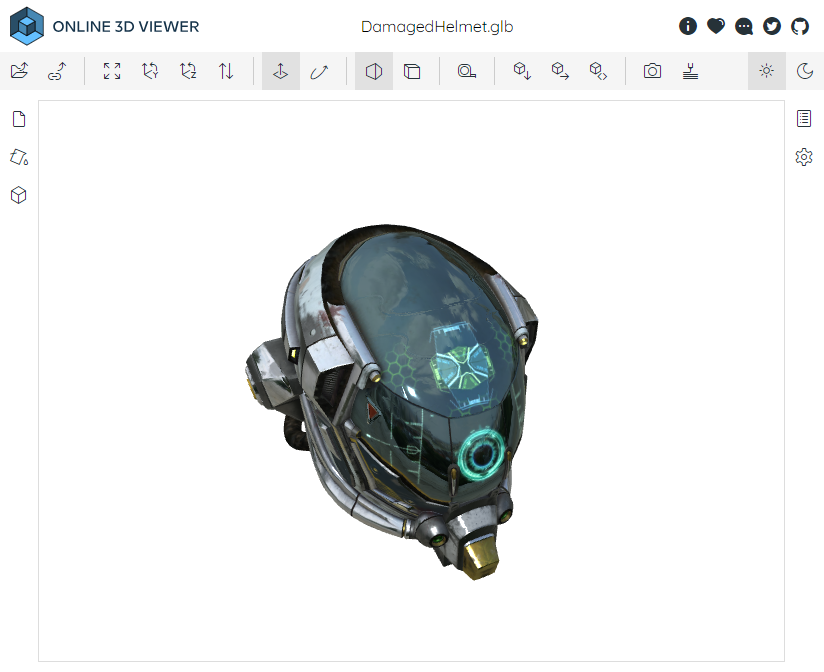
Supported file formats
- Import: 3dm, 3ds, 3mf, amf, bim, brep, dae, fbx, fcstd, gltf, ifc, iges, step, stl, obj, off, ply, wrl.
- Export: 3dm, bim, gltf, obj, off, stl, ply.
External Libraries
TellMe模型处理平台 uses these wonderful libraries: three.js, pickr, fflate, draco, rhino3dm, web-ifc, occt-import-js.
STEP Tree Deletion Demo
This demo adds a local-only STEP editing flow without changing the existing download and export features.
Start the website
npm install
npm run build_website_dev
npx http-server .
Start the local STEP save service
pip install -r tools/step_service/requirements.txt
python tools/step_service/server.py
The service listens on http://127.0.0.1:17890.
Demo flow
- Open a
.stpor.stepfile. - Select an assembly node or leaf part in the tree.
- Click
Delete Selected. - Click
Save STEP. - Reopen the downloaded file to verify the deleted subtree is gone.